
What Is an Access Point? How It Works and Why It Matters in Modern Wi-Fi Networks
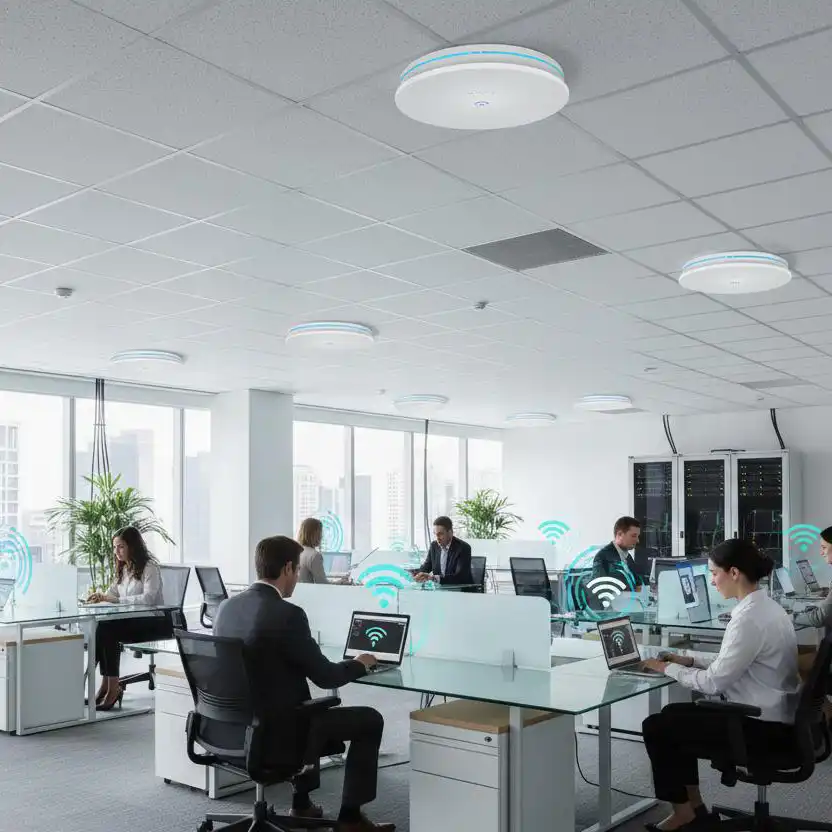
What Is an Access Point?
How It Works and Why It Matters in Modern Wi-Fi Networks
What is an access point, and why is it essential to modern Wi-Fi networks? This guide explains how access points work, how they differ from routers and mesh systems, and how antenna selection impacts wireless coverage and performance.
Table of Contents
introduction
At home, a single router is often enough. The coverage area is small, the number of connected devices is limited, and most users stay within a few rooms.
Modern business environments are different. An office floor may support hundreds of laptops and smartphones. A hotel must provide reliable connectivity across dozens of guest rooms. A warehouse may cover thousands of square meters filled with shelves, equipment, and moving vehicles.
In these environments, Wi-Fi performance is no longer just about signal strength. Coverage, user density, roaming, and network capacity all become part of the challenge. And because Wi-Fi is a shared medium, more devices don’t just mean more traffic—they mean less airtime for everyone. A single router simply was not designed to handle those requirements.
This is where access points come in. Instead of relying on one device to cover an entire building, organizations deploy multiple access points that work together to provide consistent wireless connectivity across large areas. Understanding why this approach works starts with understanding what an access point actually does—and why the antenna often decides how well it performs in the real world.
Ⅰ. What Is an Access Point?
Quick definition: An access point (AP) is a device that connects wireless clients—phones, laptops, tablets—to a wired network. It broadcasts the SSID, handles authentication, and forwards data frames between the wireless and wired sides. It does not route, NAT, or assign IP addresses.
An access point (AP) is a device that allows wireless devices to connect to a wired network. If a router is responsible for directing traffic between the internet and the local network, an access point is responsible for extending that network wirelessly to phones, laptops, tablets, and other Wi-Fi devices.
In a typical home, the wireless function is usually built into the router. In larger environments such as offices, hotels, warehouses, and campuses, dedicated access points are deployed throughout the building to provide consistent wireless coverage where a single router cannot.
An access point does not replace a router. It doesn’t handle routing, NAT, or DHCP—those jobs stay with the router or firewall. Technically, it operates at Layer 2, bridging wireless and wired traffic using MAC addresses. Multiple access points can operate together under the same network, allowing users to move throughout a facility while staying connected.
In simple terms, a router connects the network to the internet, while an access point connects wireless devices to the network. And the antenna inside or attached to that AP is what shapes how well the wireless signal actually performs.
Ⅱ. How Does an Access Point Work?
An access point connects to the wired network through an Ethernet cable—usually to a switch and sometimes directly to a router. In most business deployments, that same cable also provides power through PoE (Power over Ethernet), allowing the AP to operate with a single network connection.
The AP continuously broadcasts its network name (SSID) so nearby devices can discover it. When a laptop, smartphone, or tablet wants to join the network, it requests access to the AP. The AP verifies the device’s credentials using security protocols such as WPA2 or WPA3 and, if authentication succeeds, allows it onto the network.
Once connected, the AP begins forwarding traffic between the wireless device and the wired network. Data received over Wi-Fi is converted into Ethernet traffic, while data arriving from the wired network is transmitted wirelessly to the client. From the network’s perspective, the AP operates as a Layer 2 bridge, forwarding traffic without making routing decisions.
Because Wi-Fi is a shared medium, the AP also coordinates how devices use the wireless channel. This helps dozens of users share the same access point efficiently while reducing interference and contention.
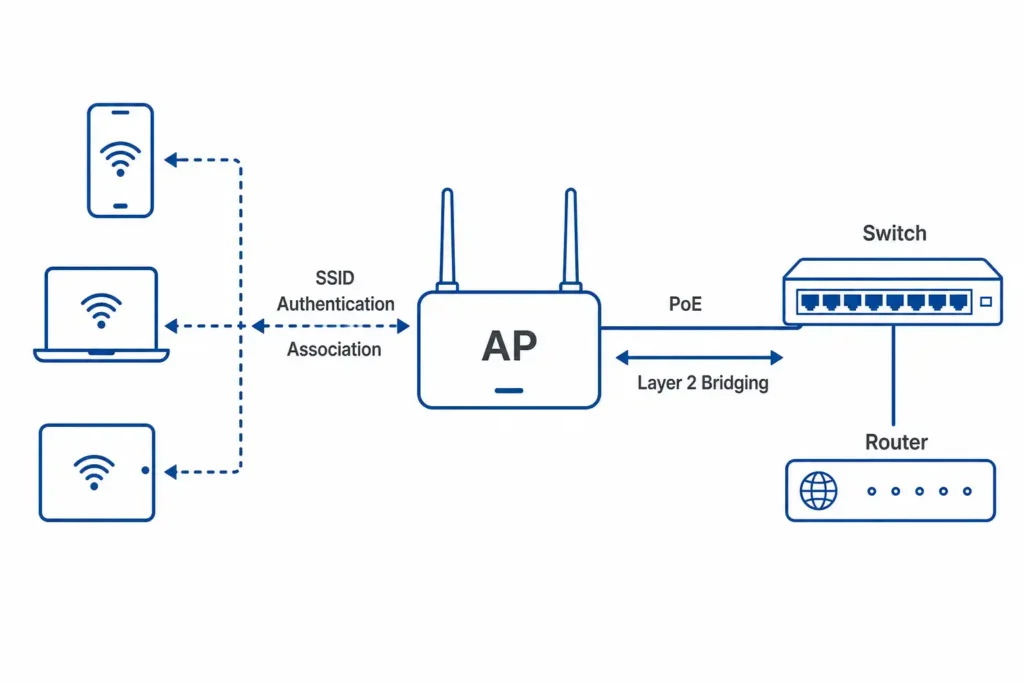
In short, an access point is more than a radio. It acts as a bridge between wired and wireless networks, manages client connections, and keeps wireless communication running smoothly.
What's Inside an Access Point?
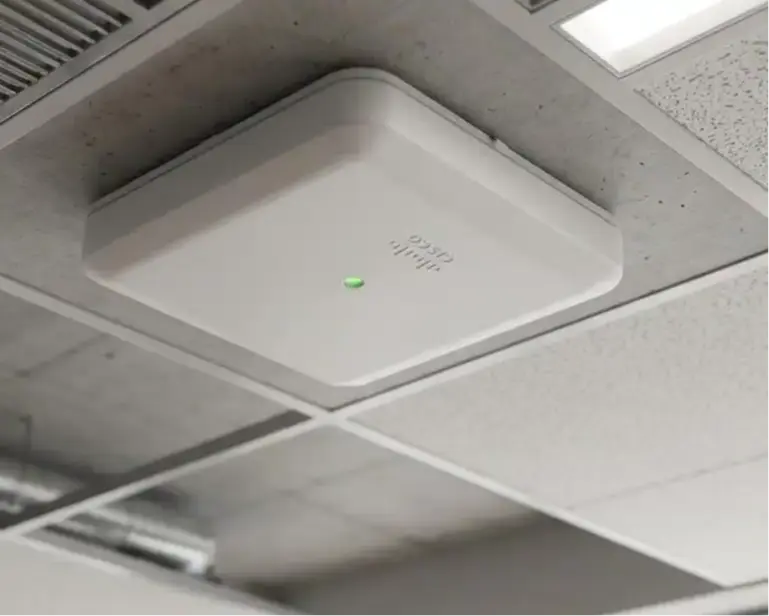
From the outside, a modern enterprise AP looks simple—a low-profile enclosure with a single Ethernet port. Inside, however, it contains four key components that work together to deliver wireless connectivity.
Mainboard:Runs the AP’s operating system, manages wireless clients, and forwards network traffic.
RF Front-End:Converts network data into radio signals and receives data from connected devices.
Internal Antennas:Usually hidden inside the enclosure. Their design and placement largely determine coverage and signal performance.
PoE Port:Provides both power and network connectivity through a single Ethernet cable.
- Why the Antenna Matters:The antenna is often the most overlooked component inside an AP. Ceiling-mounted access points typically use internal omnidirectional antennas for broad coverage, while outdoor and industrial deployments often rely on external antennas to achieve longer range or more directional coverage.
Where Does the Wi-Fi Signal Come From?
The path from a wired data packet to a device screen involves several key steps inside an access point:
1. Ethernet Connection:The process starts when the AP receives network data through the Ethernet port, usually from a switch. In enterprise deployments, PoE (Power over Ethernet) allows the same cable to provide both network connectivity and power to the access point.
2. Data Processing:The mainboard processes the incoming data, manages network traffic, and determines which connected wireless client should receive the information.
3. Wireless Signal Conversion:The AP’s radio system converts digital network data into wireless signals that can travel through the air. Modern Wi-Fi technologies use advanced transmission methods such as OFDM and OFDMA to improve efficiency and allow multiple devices to communicate more effectively.
4. RF Signal Processing:Before transmission, the RF front-end amplifies and filters the signal to ensure stable wireless communication. It prepares the signal before sending it to the antenna.
5. Antenna Transmission:The antenna is the final stage where electrical signals are converted into radio waves and transmitted into the surrounding environment. This is where antenna design directly affects coverage area, signal direction, gain, and overall wireless performance.
The reverse process works in the same way: the antenna receives wireless signals from connected devices, the RF front-end processes them, the mainboard handles the data, and the Ethernet port forwards it back to the wired network.
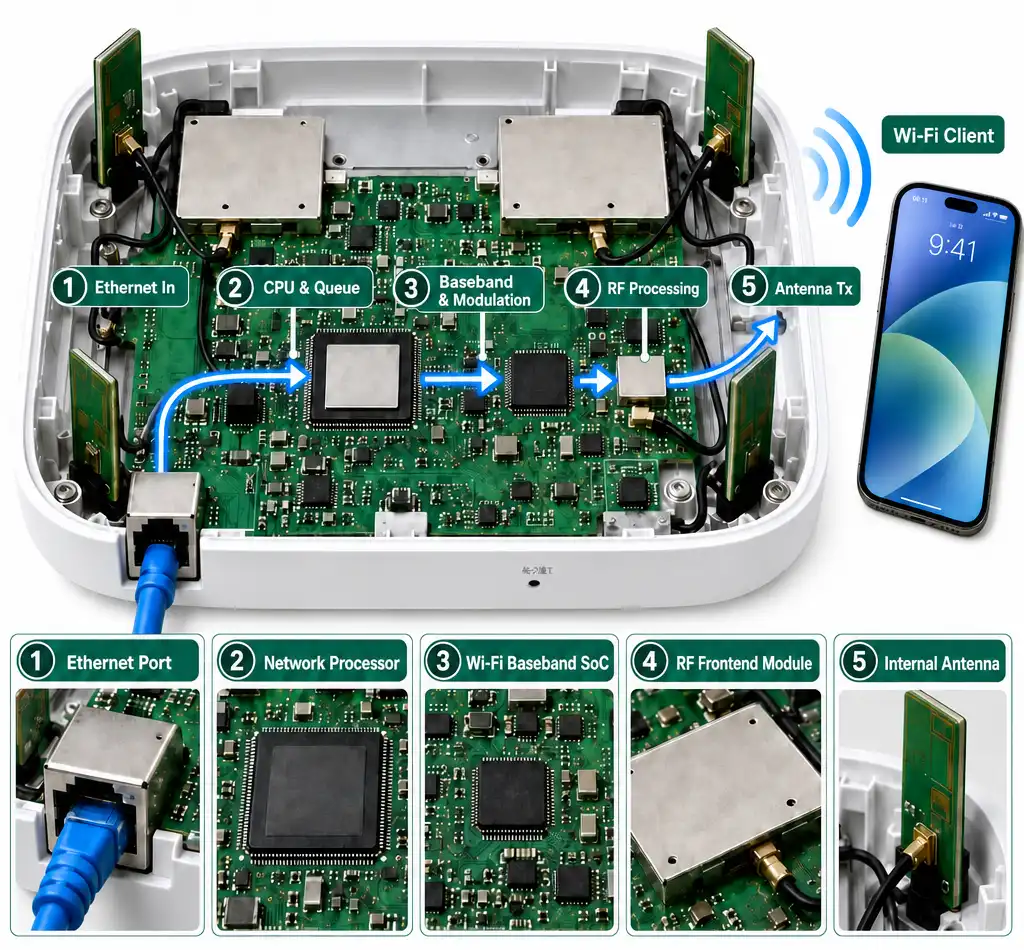
This is why the antenna matters. It is the final physical component in the wireless communication chain—and one of the key factors determining how far and how evenly the signal can reach. An access point with powerful hardware can still deliver poor performance if the antenna design does not match the deployment environment.
Ⅲ. Why Modern Networks Need More Than a Router
A home router is designed for a relatively simple job: cover a small area, support a limited number of devices, and keep setup as easy as possible. That approach works well in an apartment or small house. It starts to break down in an office, hotel, warehouse, or campus—not because the router is faulty, but because the requirements are completely different.
Coverage Limitations
Wi-Fi signals weaken as they pass through walls, glass, shelving, and concrete floors. A single router may provide acceptable coverage in a home, but it cannot reliably serve every corner of a large building. As the coverage area grows, dead zones and inconsistent performance become harder to avoid.
Device Density
Modern networks support far more than laptops and smartphones. Cameras, tablets, scanners, IoT devices, and industrial equipment all compete for the same wireless resources. Because Wi-Fi is a shared medium, adding more devices increases contention and reduces the airtime available to each one.
Mobility and Roaming
Users rarely stay in one place. They move between offices, meeting rooms, hotel corridors, production areas, and different floors. A modern wireless network must allow devices to move between coverage areas without losing connectivity or interrupting ongoing sessions.
Interference Management
Simply adding more wireless equipment does not automatically improve performance. Poor channel planning can create interference between neighboring APs, reducing throughput even when signal strength appears strong. Effective wireless design requires balancing coverage, capacity, and signal quality.
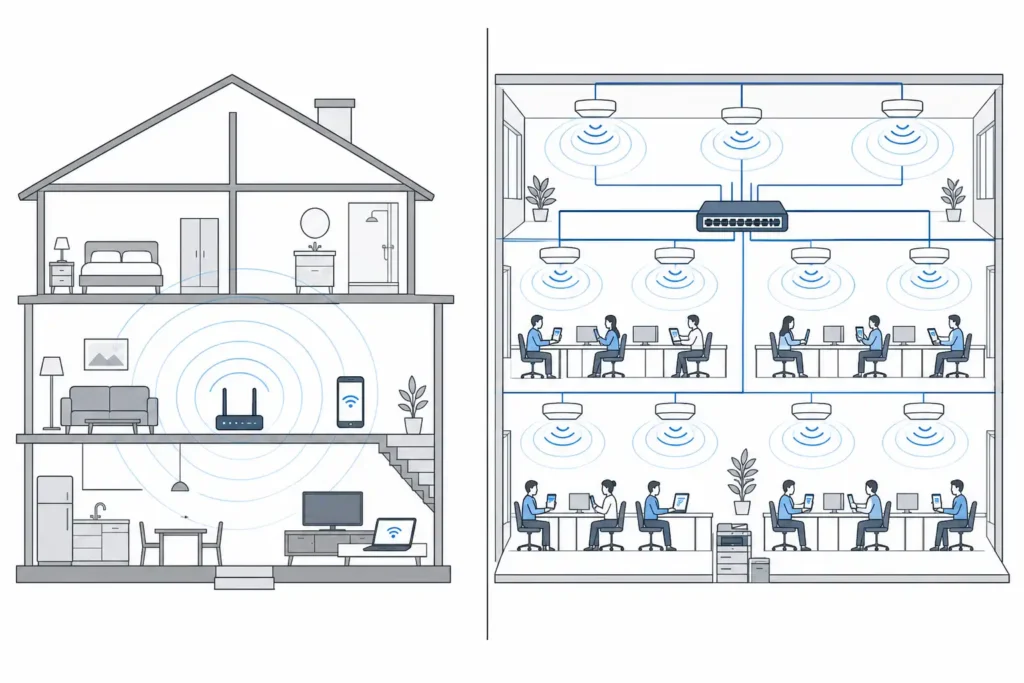
This is why modern networks separate wireless access from routing. Instead of relying on a single device to do everything, they distribute connectivity across multiple access points placed throughout the building. Each AP serves a smaller area, improving coverage, reducing contention, and creating a more consistent user experience.
Multiple access points can operate as part of the same wireless network, sharing the same SSID and security policies while covering different areas of a facility. Combined with proper antenna selection and placement, this approach allows the network to be designed around the building itself rather than the limitations of a single router.
In short, access points do not replace routers—they extend wireless connectivity far beyond what a single router was ever designed to support.
Ⅳ. Access Point vs Router vs Mesh: What's the Difference?
These three terms get mixed up constantly, and it’s easy to see why. A home “router” often contains an access point, while a mesh system is essentially multiple access points working together. But they are not the same thing, and they solve different problems.
| Feature | Router | Access Point | Mesh System |
|---|---|---|---|
| Primary Role | Connects the local network to the internet | Provides wireless access to an existing network | Extends Wi-Fi coverage using multiple nodes |
| Routing & NAT | Yes | No | Usually handled by the main router |
| DHCP | Yes | No | Usually handled by the main router |
| Wi-Fi Function | Often built-in | Yes | Yes |
| Coverage | Small to medium areas | Scalable with multiple APs | Medium to large homes |
| Roaming | Limited | Excellent in managed AP deployments | Good |
| Ethernet Backhaul | N/A | Recommended | Optional |
| Scalability | Limited | High | Moderate |
| Best Fit | Homes and small offices | Offices, hotels, warehouses, campuses | Homes where running cables is difficult |
A router is the gateway between your local network and the internet. It handles routing, IP addressing, and network management. Many home routers also include a built-in access point, which is why the terms are often used interchangeably.
A standalone access point focuses solely on wireless access. It doesn’t route traffic or assign IP addresses. Instead, it connects to an existing network and extends Wi-Fi coverage. In business environments, multiple APs are often managed through a controller or cloud platform, enabling centralized management and seamless roaming.
A mesh system uses multiple nodes to expand wireless coverage without requiring Ethernet cabling between every device. It is easy to deploy and works well in homes and small offices, especially where running cables is difficult. However, mesh networks generally offer less scalability and control than dedicated enterprise AP deployments.
If you can run a cable to a second AP, a wired access point will almost always outperform a mesh node. And in larger environments, properly designed AP networks remain the foundation of reliable Wi-Fi.
Ⅴ. Common Types of Access Points
Access points come in different physical forms, each designed for a specific installation environment. The four most common types are ceiling APs, wall plate APs, outdoor APs, and industrial APs. The differences are not just cosmetic—they affect antenna choice, mounting, coverage pattern, and how the AP performs in real-world conditions.
Ceiling AP
Mounted on the ceiling, typically with integrated omnidirectional antennas that distribute coverage evenly across open areas.
Typical use: offices, classrooms, hotel corridors, conference rooms.
Wall Plate AP
Installed in a standard wall box, often replacing an Ethernet outlet. Compact and designed for dedicated in-room coverage.
Typical use: hotel guest rooms, dormitories, hospital patient rooms.
Outdoor AP
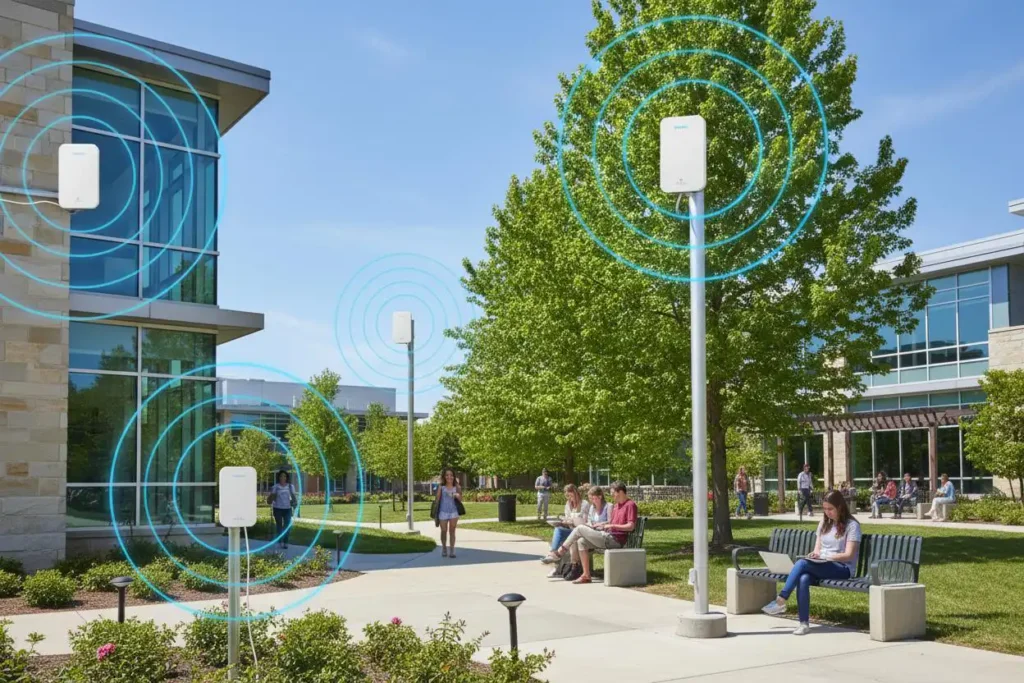
Built with weatherproof enclosures, typically rated IP66 or IP67. Can use omnidirectional, panel, or sector antennas depending on coverage requirements.
Typical use: campuses, parking lots, stadiums, public spaces, and industrial yards.
Industrial AP
Ruggedized for harsh environments, including wide temperature ranges, dust, vibration, and moisture. External antennas are commonly used to improve flexibility and durability.
Typical use: factories, warehouses, ports, and manufacturing facilities.
For each of these AP types, the antenna choice matters. A ceiling AP often pairs well with a MIMO ceiling antenna, while an outdoor AP may need a higher-gain omnidirectional or panel antenna to cover open space.
- The physical type is more than a mounting detail. It influences antenna selection, installation height, coverage pattern, and overall wireless performance. Choosing the right AP form factor is often the first step toward building a reliable wireless network.
Ⅵ. Indoor vs Outdoor Access Points: What Actually Changes
At first glance, an indoor and an outdoor access point may look similar. Both provide Wi-Fi connectivity, support the same wireless standards, and often use the same management platform. The difference lies in the environment they are built for.
An access point designed for a conference room faces very different challenges than one mounted on a stadium wall or a utility pole. Weather, temperature, antenna design, and installation height all influence which type of AP should be used.
| Feature | Indoor AP | Outdoor AP |
|---|---|---|
| Environment | Offices, hotels, classrooms | Campuses, parks, warehouses |
| Enclosure | Standard housing | IP66/IP67 weatherproof |
| Antennas | Usually internal omni | Omni, panel, sector, external |
| Coverage | Controlled indoor spaces | Large open areas |
| Installation | Ceiling or wall | Pole, mast, exterior wall |
The biggest difference is not the radio inside the AP—it is how the signal is distributed and protected in the environment where it operates. An indoor AP is optimized for walls, ceilings, and room-to-room coverage. An outdoor AP is designed to withstand weather while delivering coverage across much larger spaces.
This is also where antenna selection diverges. Indoor APs typically use low-gain omni directional antennas (3–5 dBi) to spread signal evenly without creating interference between rooms. Outdoor APs often use higher-gain omni directional antennas (6–12 dBi) for broad coverage, or panel and sector antennas when the goal is to focus signal down a specific path—such as a parking lot, a stadium section, or a point-to-point link between buildings.
Temperature and durability are the other dividing line. Indoor APs are built for climate-controlled spaces. Outdoor APs need to handle temperature swings, moisture, dust, and sometimes vibration—which is why they are rated for wider operating ranges and ruggedized enclosures.
Many projects need both types working together. A hotel, for example, might use wall-plate APs for guest rooms, ceiling APs for corridors, and outdoor APs for the parking area or pool deck. They can share the same SSID and management platform, but they rarely use the same antenna design.
Whether you deploy indoors, outdoors, or both, the next question is usually the same: how many APs do you actually need? Let’s look at that next.
VII. Typical Access Point Deployment Scenarios
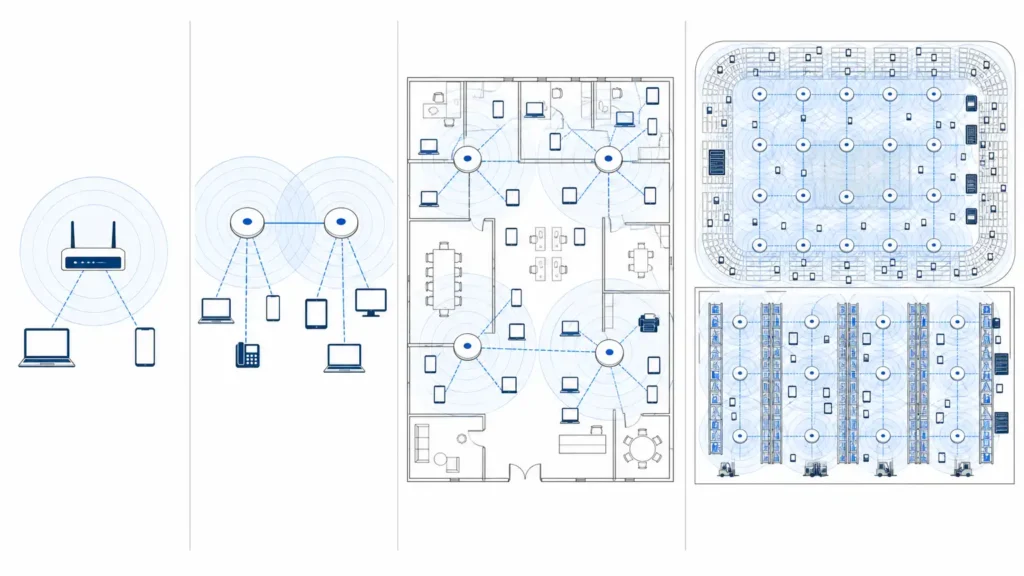
Access points are not a one-size-fits-all product. The right choice depends on the environment—how large the area is, how many users connect, whether devices move, and what kind of obstacles are in the way. These four scenarios cover the majority of deployments.
Home
A small area with a handful of devices. A single router with built-in Wi-Fi is often enough. If coverage is uneven, a second access point wired back to the main router beats a mesh node in most cases.
Typical setup: Router-integrated Wi-Fi or a standalone access point connected to the main router.
SMB & Office
Open floors, meeting rooms, and dozens to hundreds of devices. Multiple ceiling APs managed by a controller or cloud platform. Roaming and VLAN separation (staff, guest, IoT) are essential. Offices typically use ceiling-mounted APs, while hotels often rely on wall-plate APs to provide dedicated room-by-room coverage.
Typical AP: Ceiling AP with omnidirectional antenna, managed by a controller or cloud platform.
High-Density Venues
Stadiums, airports, convention centers. Thousands of concurrent users in a confined area. Capacity matters more than coverage. High-density APs, channel planning, band steering, and directional antennas are used to reduce interference. In these environments, simply adding more APs without proper design can actually increase interference and reduce performance.
Typical AP: High-density AP with sector or panel antenna.
Industrial & Outdoor
Warehouses, ports, campuses, and harsh environments. High racks, moving vehicles, and wide temperature ranges create unique wireless challenges. Industrial APs with external directional antennas can focus signal along aisles, while outdoor deployments often use directional or sector antennas to improve coverage and signal control across large areas.
Typical AP: Industrial or outdoor AP with panel, sector, or MIMO antenna.
- In every scenario, the AP type is only half the decision. The antenna determines how the signal actually spreads—whether it covers a wide area evenly or focuses on a specific direction. Choosing the right combination of AP and antenna is often what separates average Wi-Fi from reliable Wi-Fi.
VIII. How Many APs Do You Actually Need?
There Is No Universal Formula
One of the most common questions in Wi-Fi planning is how many access points are needed. The short answer is: it depends.
A 1,000-square-meter office, warehouse, and hotel may require completely different numbers of APs. Coverage is only part of the equation. User density, building materials, application requirements, and antenna design all affect the final deployment.
Four Factors That Determine AP Count
· Coverage Area
The larger the area, the more coverage cells are needed. Walls, concrete, shelving, and metal structures can significantly reduce signal propagation.
· User Density
A conference room with 100 users may require more AP capacity than an office floor twice its size with only 20 users.
· Application Requirements
Basic web browsing places a different load on the network than video conferencing, cloud applications, or real-time communication.
· Antenna Design
Coverage patterns influence how efficiently an AP serves an area. A directional antenna may cover a long warehouse aisle more effectively than several omnidirectional APs.
- In many deployments, AP count is driven by capacity before coverage. The goal is not simply to eliminate dead zones—it is to ensure that users receive reliable performance when the network is busy.
IX. How Antennas Affect Access Point Performance
- The access point sends the signal. The antenna decides where it goes.
An access point generates and processes wireless signals, but the antenna determines how those signals are distributed in the real world. Two networks can use the same AP hardware and deliver very different results simply because of antenna selection and placement.
Coverage, capacity, and signal quality are all influenced by the antenna—not just the access point itself.
Coverage Is About Shape, Not Just Distance
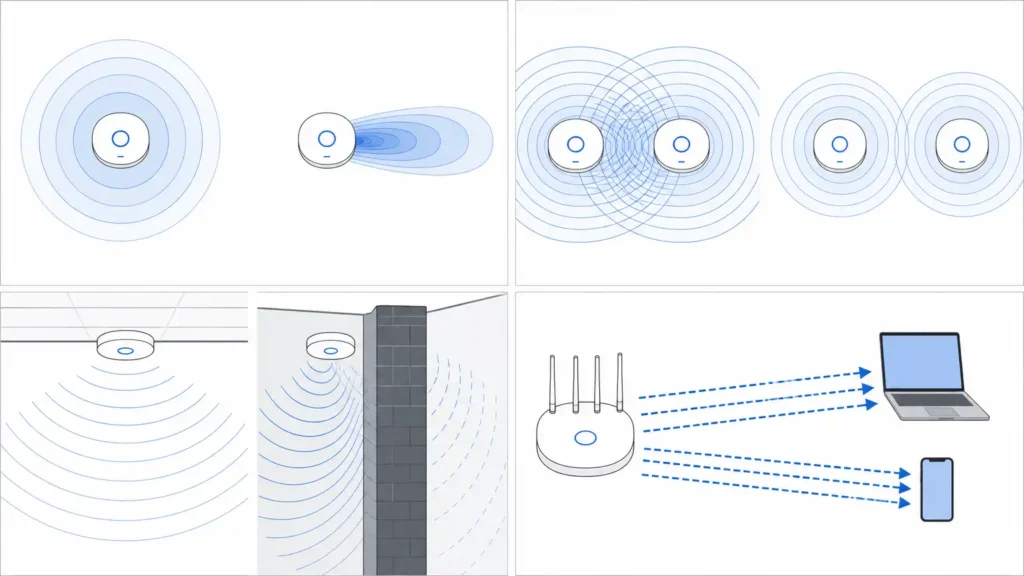
Antennas do not create more power. They shape how existing RF energy is distributed. An omnidirectional antenna spreads energy in all directions, while a directional antenna concentrates it into a narrower beam. Choosing the wrong pattern can leave coverage gaps or create unnecessary interference.
Better Coverage Does Not Always Mean Better Wi-Fi
In high-density environments, the goal is not always maximum coverage. When signals overlap too heavily, interference increases and network capacity can drop. Sector and panel antennas are often used to control coverage boundaries and improve signal quality.
In practice, this means a ceiling AP in an open office might use a 2.4/5GHz 3-Port MIMO Ceiling Antenna to spread coverage evenly, while a warehouse AP aiming down a long aisle might use a directional panel antenna like our 4.9-6.1GHz 24dBi MIMO High Gain Panel Antenna to focus energy where it is needed.
Placement Matters
Antenna performance depends on installation as much as hardware. Mounting height, nearby metal objects, walls, shelving, and even antenna orientation can significantly affect coverage. A well-positioned antenna often delivers greater improvement than simply increasing transmit power.
MIMO Adds Another Layer
Modern APs use multiple antennas to carry spatial streams, and antenna design affects how efficiently those streams operate. Poor isolation can reduce throughput even on a 4×4 or 8×8 AP.
- This is why antenna selection is an engineering decision, not just a hardware choice. The right antenna helps an AP deliver the coverage, capacity, and signal quality required by its environment.
Access points provide wireless connectivity, but antennas determine how effectively that connectivity reaches users. Selecting the right antenna pattern and installing it correctly are often the difference between acceptable Wi-Fi and reliable Wi-Fi.
X. Access Point Security: WPA3, VLANs, and Guest Networks
Wi-Fi security is about more than just keeping unauthorized users off the network. A secure access point also helps control who can connect, what they can access, and how different types of traffic are separated.
WPA3: Stronger Wireless Protection
WPA3 is the latest Wi-Fi security standard and provides stronger protection than WPA2, particularly against password-based attacks. Most modern enterprise APs support WPA3 and it is generally the recommended option for new deployments. When possible, avoid relying solely on legacy WPA2 compatibility settings.
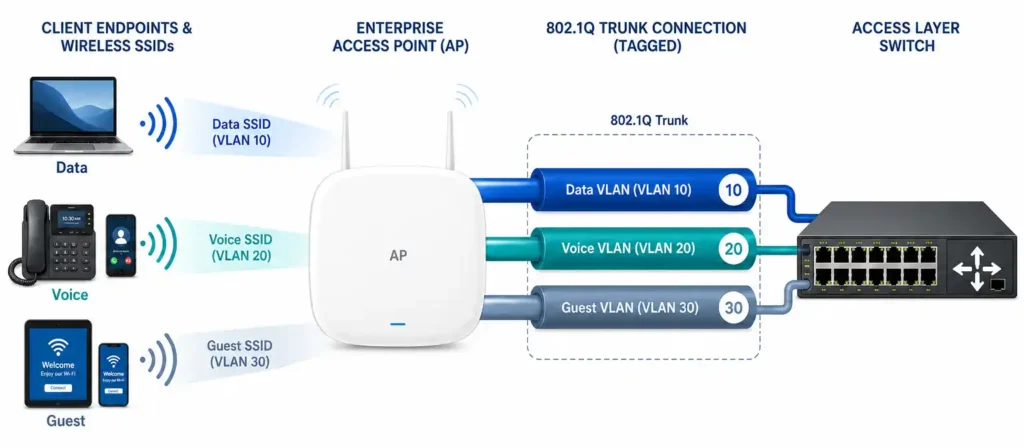
Separate Staff, Guests, and IoT Devices
Not every device on a network should have the same level of access. Employees may need access to internal systems, while visitors only require internet connectivity. IoT devices such as cameras, sensors, and access control systems often need even more restricted communication.
Using separate SSIDs and VLANs helps isolate these devices, reducing security risks and making the network easier to manage.
Separate SSIDs Do Not Automatically Mean Network Isolation
Creating separate Wi-Fi names for employees, guests, and IoT devices helps organize network access, but SSIDs alone do not provide true isolation. In enterprise environments, VLANs and access control policies are typically used to separate traffic and restrict access between different user groups.
For example, a guest network may allow internet access while preventing connections to internal servers, printers, or employee devices. Similarly, IoT devices are often placed in dedicated VLANs to reduce unnecessary communication with business systems.
Effective wireless security depends not only on encryption and authentication, but also on proper network segmentation and access control.
Authentication Matters
A shared Wi-Fi password may be sufficient for a small office, but larger organizations often use individual user credentials through centralized authentication systems. This makes it easier to manage access rights and remove permissions when users leave the organization.
Security Includes Coverage
Security is not only a software issue. If a Wi-Fi signal extends well beyond the intended area, it creates unnecessary exposure. Proper antenna selection and coverage planning help keep the signal where it is needed while reducing overspill into neighboring spaces.
A secure wireless network combines strong encryption, network segmentation, controlled authentication, and well-planned coverage. Together, these layers provide a stronger foundation than any single security feature alone.
XI. Common Access Point Mistakes
Most Wi-Fi problems don’t start with faulty hardware. More often, they come from assumptions that sound reasonable but don’t hold up in real deployments. Here are three of the most common examples.
| WHAT PEOPLE THINK | WHAT ACTUALLY HAPPENS |
|---|---|
| More APs = Better Wi-Fi | More APs can create interference |
| AP Placement Doesn’t Matter | Placement often matters more than hardware |
| Mesh = Enterprise Wi-Fi | They are designed for different environments |
| Full Signal Bars = Good Wi-Fi | Capacity and interference still affect performance |
More APs = Better Wi-Fi?
Not necessarily.
Adding access points can improve both coverage and capacity, but only when channels, transmit power, and coverage overlap are properly planned. In dense deployments, too many APs operating on the same channels can create co-channel interference, reducing throughput and increasing contention between clients.
The goal is not simply to add more APs. The goal is to create the right amount of coverage with the least amount of interference.
Does AP Placement Really Matter?
Absolutely.
An access point can only perform as well as its installation location allows. Mounting an AP above metal shelving, inside a cabinet, or behind structural obstacles can significantly weaken signal propagation and create coverage gaps.
In many cases, relocating an AP delivers a greater improvement than replacing it with a newer model.
Is Mesh the Same as an Enterprise AP?
They may look similar from the user’s perspective, but they are designed for different environments.
Mesh systems prioritize simple deployment and are ideal for homes and small spaces. Enterprise access points focus on scalability, centralized management, VLAN support, and standards-based roaming technologies such as 802.11k, 802.11v, and 802.11r.
If Ethernet cabling is available, a wired access point will generally provide more consistent performance than a wireless mesh node.
Do Full Signal Bars Mean Good Wi-Fi Performance?
Not always. Strong signal strength does not guarantee good performance.
A device may show full signal bars while still experiencing slow speeds or unstable connections. In many cases, the problem is not coverage but capacity. Every access point has a limited amount of wireless airtime to share among connected devices.
Interference can also reduce performance. Nearby APs, overlapping channels, and other wireless equipment may affect throughput without changing the signal indicator.
Good Wi-Fi depends on more than coverage alone. Capacity planning, interference management, and proper network design are just as important as signal strength.
Reliable Wi-Fi is rarely the result of a single product. It comes from choosing the right access point, installing it in the right location, and designing the network around the environment it serves.
XII. The Future of Access Points (2026–2030)
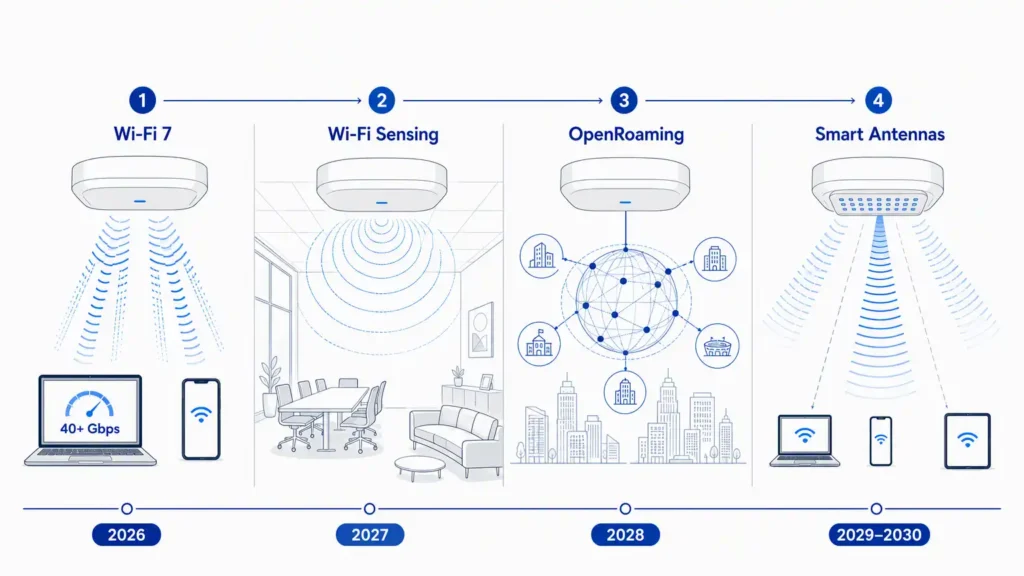
Access points are no longer just devices that provide Wi-Fi coverage. As networks support more devices, higher bandwidth applications, and smarter services, APs are evolving into intelligent wireless platforms. Several trends are expected to shape enterprise Wi-Fi over the next few years.
Wi-Fi 7 Becomes Mainstream
Wi-Fi 7 is expected to become the standard for new enterprise deployments. Features such as Multi-Link Operation (MLO) and wider 320 MHz channels will improve throughput, reduce latency, and support increasingly demanding applications. At the same time, they will push networks toward higher device density—making RF planning and antenna design more important than ever.
Access Points Become Sensors
Emerging Wi-Fi sensing technologies allow access points to detect movement and occupancy by analyzing changes in wireless signals. Applications such as occupancy monitoring, intrusion detection, and smart building automation are already beginning to appear. In these scenarios, the AP is no longer just providing connectivity—it is also helping the network understand what is happening in the physical environment.
Seamless Roaming Across Networks
Technologies such as OpenRoaming aim to make Wi-Fi access as effortless as cellular connectivity, allowing users to move between trusted networks without repeatedly entering credentials. Users increasingly expect Wi-Fi to work like cellular service—connect automatically, stay connected, and simply follow them wherever they go.
Smarter Antenna Systems
As wireless environments become denser, antenna design will play an even larger role in controlling interference and improving coverage efficiency. AI and software can optimize channel plans and roaming decisions, but they cannot change the physical behavior of the antenna. Future APs will become more intelligent, but they will still rely on well-designed antenna systems to deliver reliable performance.
XIII. Understanding the Enterprise AP Landscape
Enterprise Wi-Fi is shaped by a handful of major vendors, each taking a slightly different approach to network management and deployment.
| AP Vendor | Focus Area |
|---|---|
| Cisco Meraki Access Point | Cloud-managed enterprise networking |
| Aruba Access Point | Campus mobility and enterprise Wi-Fi |
| Juniper Mist Access Point | AI-driven network operations |
| Ruckus Access Point | High-density wireless environments |
| Ubiquiti UniFi Access Point | SMB and campus deployments |
| TP-Link Omada Access Point | Cost-effective business networking |
While management platforms and software capabilities vary, the fundamentals remain the same. Every access point still depends on radio performance, antenna design, interference management, and deployment planning to deliver reliable wireless connectivity.
final thoughts
At its core, an access point has a straightforward job: connect wireless devices to the network. What makes Wi-Fi design challenging is everything around it—where the AP is installed, how multiple APs work together, and how the wireless signal is distributed throughout the environment.
If you take one thing from this guide, let it be this: the access point sends the signal, but the antenna decides where it goes. Two networks can use the same AP hardware and deliver completely different results because of antenna selection and placement.
The best wireless networks are not necessarily built with the most expensive hardware. They are built by matching the right access point, the right antenna, and the right deployment strategy to the environment.