
Wi-Fi 6 vs Wi-Fi 7: What’s the Difference and Which One Should You Choose?

Introductions
Wi-Fi technology has evolved far beyond simply making wireless networks faster.
For many years, each new Wi-Fi generation focused mainly on increasing peak data rates. But as homes, offices, factories, warehouses and public spaces connect more devices than ever, network efficiency has become just as important as raw speed.
Wi-Fi 6, based on the IEEE 802.11ax standard, focuses heavily on improving efficiency in crowded wireless environments. Wi-Fi 7, based on IEEE 802.11be, builds on that foundation with wider channels, higher-order modulation and new multi-link capabilities designed to increase throughput and improve responsiveness.
So, is Wi-Fi 7 simply a faster version of Wi-Fi 6? Not exactly.
The two standards target different stages of wireless network development. Understanding their differences can help you choose the right routers, access points, Wi-Fi antennas and wireless infrastructure for your application.
I. What Is Wi-Fi 6?
Wi-Fi 6 is the consumer-friendly name for IEEE 802.11ax. It was designed to improve wireless network efficiency, particularly when many devices share the same network.
Previous generations could deliver high speeds, but performance often became less efficient as the number of connected devices increased. Wi-Fi 6 addresses this challenge through technologies such as OFDMA, uplink and downlink MU-MIMO, BSS Coloring and Target Wake Time.
Rather than focusing only on making one device faster, Wi-Fi 6 improves the way an access point manages multiple devices. This makes it particularly useful in environments such as offices, schools, apartment buildings, hotels, retail stores and smart home networks, where many devices may need to communicate at the same time.
Wi-Fi 6 operates in the 2.4 GHz and 5 GHz bands. Wi-Fi 6E extends the same 802.11ax technology into the 6 GHz band where local regulations permit its use.
II. What Is Wi-Fi 7?
Wi-Fi 7 is based on IEEE 802.11be, also known as Extremely High Throughput, or EHT. Its goal is to deliver significantly higher wireless capacity and throughput while also improving efficiency and responsiveness.
Depending on the regulatory environment and the equipment used, Wi-Fi 7 can operate in the 2.4 GHz, 5 GHz and 6 GHz bands. One of its most important advantages comes from the ability to use new and wider spectrum resources, especially in the 6 GHz band where available.
Wi-Fi 7 also introduces several important capabilities, including up to 320 MHz channel bandwidth, 4096-QAM, Multi-Link Operation, Multi-RU support and enhanced puncturing capabilities.
Together, these technologies allow compatible devices to use wireless resources more efficiently and create higher potential throughput than Wi-Fi 6. However, real-world performance still depends on the access point, client device, available spectrum, antenna design, channel conditions, interference and network configuration.
III. Wi-Fi 6 vs Wi-Fi 7: Key Differences
| Feature | Wi-Fi 6 | Wi-Fi 7 |
| IEEE Standard | 802.11ax | 802.11be |
| Primary Frequency Bands | 2.4 GHz and 5 GHz | 2.4 GHz, 5 GHz and 6 GHz where permitted |
| 6 GHz Support | Wi-Fi 6E variant | Supported by Wi-Fi 7 equipment where available |
| Maximum Channel Bandwidth | 160 MHz | 320 MHz |
| Highest Modulation | 1024-QAM | 4096-QAM |
| Maximum Spatial Streams | Up to 8 | Up to 16 |
| OFDMA | Supported | Supported with additional enhancements |
| MU-MIMO | Uplink and downlink | Enhanced capabilities |
| Multi-Link Operation | No | Yes |
| Multi-RU | No | Yes |
| Preamble Puncturing | Supported in 802.11ax | More flexible capability |
| Theoretical Maximum PHY Rate | Up to 9.6 Gbps | Up to approximately 46 Gbps under specified maximum theoretical conditions |
Notice: The theoretical maximum data rate should not be confused with actual Internet speed.
A Wi-Fi network will rarely operate at its theoretical PHY maximum. Actual throughput depends on many factors, including channel bandwidth, spatial streams, modulation rate, signal quality, interference, protocol overhead and the capabilities of both the access point and the client device.
For this reason, choosing between Wi-Fi 6 and Wi-Fi 7 requires more than comparing headline speed figures.
IV. How Wi-Fi 6 Improves Wireless Network Efficiency
The most important idea behind Wi-Fi 6 is efficiency.
As more devices connect to the same wireless network, simply increasing the maximum link speed does not solve every problem. The network also needs a more efficient way to schedule users and use available spectrum.
OFDMA: Serving Multiple Devices More Efficiently
OFDMA, or Orthogonal Frequency Division Multiple Access, allows a wireless channel to be divided into smaller resource units.
Instead of assigning the entire channel to one device for a transmission opportunity, an access point can schedule multiple compatible devices using different resource units. This can improve efficiency when many users exchange relatively small amounts of data.
For example, an office may have laptops, smartphones, IP phones, wireless sensors and other connected devices communicating at the same time. OFDMA helps the network manage these transmissions more efficiently than relying solely on a single-user approach.

MU-MIMO: Using Spatial Resources for Multiple Users
Wi-Fi 6 supports both uplink and downlink MU-MIMO.
MU-MIMO uses multiple spatial streams to communicate with multiple compatible devices simultaneously under suitable channel conditions.
Its benefits depend on factors such as the number of antennas, access point capabilities, client support, device location and radio conditions. It does not automatically mean every connected device receives its own dedicated stream.
When the network and devices support it effectively, MU-MIMO can increase overall network capacity and improve efficiency for multiple users.


BSS Coloring: Improving Spatial Reuse
Dense Wi-Fi environments often contain many nearby networks using the same or overlapping channels.
Wi-Fi 6 introduces BSS Coloring to help devices distinguish transmissions associated with their own Basic Service Set from transmissions originating from neighboring networks. This mechanism can improve spatial reuse by helping devices make more informed decisions about when the wireless medium can still be used.
BSS Coloring does not eliminate interference, but it can improve efficiency in crowded environments such as apartment buildings, hotels, campuses and large office deployments.

Target Wake Time: Reducing Unnecessary Power Consumption
Target Wake Time, or TWT, allows compatible devices and access points to schedule specific communication times. A device does not need to remain active continuously while waiting for possible network traffic. Instead, it can wake according to an agreed schedule, exchange data and return to a lower-power state when appropriate.
This feature can be particularly useful for battery-powered devices and certain IoT applications.
However, the actual power-saving benefit depends on device implementation, traffic patterns and application requirements.

V. What Makes Wi-Fi 7 Different?
Wi-Fi 7 builds on the multi-user efficiency introduced by Wi-Fi 6, but its most significant improvements focus on wider bandwidth, higher data density and more flexible use of multiple wireless links.
320 MHz Channels: More Spectrum for Higher Throughput
Wi-Fi 7 supports channel widths of up to 320 MHz.
Compared with the 160 MHz maximum channel bandwidth supported by Wi-Fi 6, a 320 MHz channel can provide substantially more spectrum for a single wireless transmission.
The practical availability of 320 MHz channels depends heavily on regional spectrum regulations and the available 6 GHz spectrum. This is an important point for network planning. A Wi-Fi 7 device does not automatically operate with a 320 MHz channel simply because it supports Wi-Fi 7. The access point, client device, regulatory domain and local spectrum environment must all support the configuration.
When available, wider channels can benefit high-throughput applications such as large local file transfers, high-resolution media streaming and high-capacity enterprise networks.

4096-QAM: Carrying More Data Per Symbol
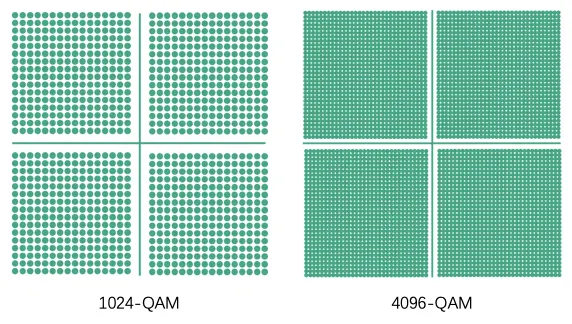
Wi-Fi 7 increases the highest modulation order from 1024-QAM to 4096-QAM.
1024-QAM can represent 10 bits per symbol, while 4096-QAM can represent 12 bits per symbol. At the highest modulation level, this represents a 20% increase in bits per symbol.
Higher-order modulation can improve peak spectral efficiency, but it also requires better signal quality. In other words, a device will not necessarily use 4096-QAM all the time. The modulation and coding scheme changes according to radio conditions and link quality.
This makes 4096-QAM most useful when the signal environment can support it.
Multi-Link Operation: One of Wi-Fi 7's Most Important Features
Multi-Link Operation, or MLO, is one of the defining features of Wi-Fi 7.
Traditional Wi-Fi operation generally uses one primary link for a connection at a given time. MLO allows compatible Wi-Fi 7 devices to establish and manage multiple links as part of the same connection.
Depending on the implementation and supported operating mode, MLO can improve throughput, reduce waiting time and provide greater flexibility when radio conditions change.
For example, a compatible device may use resources associated with more than one band or channel rather than relying entirely on a single wireless link.
This does not mean every Wi-Fi 7 device will always aggregate 2.4 GHz, 5 GHz and 6 GHz simultaneously. Actual MLO behavior depends on hardware capabilities, implementation and network configuration.
Still, MLO gives Wi-Fi 7 a major architectural advantage because it allows wireless connectivity to become more flexible than the traditional single-link model.

Multi-RU: More Flexible Resource Allocation
Wi-Fi 6 introduced resource units as part of OFDMA scheduling.
Wi-Fi 7 expands resource allocation flexibility through Multi-RU operation, allowing a user to receive multiple resource units under supported conditions.
This gives the scheduler additional options for assigning fragmented or non-contiguous spectrum resources efficiently.
The benefit is especially relevant when network conditions make it difficult to allocate one ideal continuous block of spectrum to every user.

Preamble Puncturing: Avoiding Unusable Parts of a Wide Channel
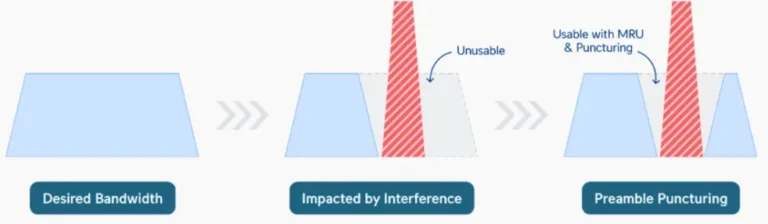
Wide channels can improve throughput, but they also create a challenge. If part of a wide channel is unavailable or occupied, the network may not want to abandon all of the remaining spectrum.
Preamble puncturing allows certain portions of a channel to be excluded while other permitted portions remain available for transmission.
Wi-Fi 6 already introduced preamble puncturing support, while Wi-Fi 7 expands its flexibility and usefulness. This capability can help Wi-Fi networks make better use of wide channels in environments where parts of the spectrum cannot be used.It does not create new spectrum, but it can reduce the amount of otherwise usable bandwidth that would be lost because of limited portions of the channel.
VI. Is Wi-Fi 7 Always Faster Than Wi-Fi 6?
Under comparable conditions, Wi-Fi 7 has a much higher performance ceiling. It can use wider channels, higher-order modulation, more spatial streams and Multi-Link Operation. These capabilities create the potential for substantially higher throughput.
But “Wi-Fi 7 is faster” is only part of the story.
If a Wi-Fi 7 router connects to an older Wi-Fi client, the connection will operate according to the capabilities supported by that client. A Wi-Fi 7 access point also cannot overcome limitations caused by a slow Internet connection, poor signal coverage or severe interference.
For many users, the first noticeable benefit may not be the theoretical maximum speed.
In a well-designed network, Wi-Fi 7 can offer more capacity and more flexibility for demanding traffic. Wi-Fi 6, meanwhile, remains highly capable and may already provide more than enough performance for many existing applications. The right choice depends on the network.
VII. Wi-Fi 6 vs Wi-Fi 7 for Different Applications
Home and Small Office Networks
Wi-Fi 6 remains a practical choice for many homes and small offices.
It handles modern multi-device environments well and supports applications such as video streaming, video conferencing, cloud services, online gaming and smart home connectivity.
Wi-Fi 7 becomes more attractive when the network includes multiple high-performance devices, multi-gigabit Internet access or demanding local traffic such as high-speed NAS transfers.
Enterprise and High-Density Environments
Both Wi-Fi 6 and Wi-Fi 7 can support enterprise networks.
Wi-Fi 6 already introduced major improvements for dense deployments through OFDMA, MU-MIMO and BSS Coloring.
Wi-Fi 7 adds greater capacity and flexibility, especially when compatible clients, 6 GHz spectrum and high-capacity wired backhaul are available.
Large offices, campuses, convention centers and other demanding environments may benefit from Wi-Fi 7 as device adoption increases.
High-Bandwidth Applications
Applications involving very large data transfers can benefit from Wi-Fi 7’s higher potential throughput.
Examples include high-resolution video workflows, large file transfers, high-speed local storage access and other data-intensive wireless applications.
The benefit becomes most meaningful when the entire network can support the higher data rates. This includes the access point, client device, Ethernet backhaul, switches and storage infrastructure.
Industrial Wireless Networks
Industrial environments often require more than high data rates.
Network designers may also need to consider reliability, roaming behavior, interference, security, redundancy and deterministic communication requirements.
Wi-Fi 7 can provide additional capacity and flexibility for industrial wireless applications, but suitability should be evaluated according to the specific system requirements rather than assuming that a newer Wi-Fi standard automatically meets every industrial communication requirement.
VIII. Wi-Fi 6 or Wi-Fi 7: Which Should You Choose?
Wi-Fi 6 is still an excellent choice when your priority is mature technology, good multi-device performance and a balance between capability and deployment cost. It works well for many home, office, commercial and IoT environments.
Wi-Fi 7 is worth considering when you need a higher performance ceiling, access to wider available spectrum, multi-gigabit wireless capacity or advanced capabilities such as Multi-Link Operation. It is also a stronger option for new infrastructure designed with future device adoption in mind.
Before choosing either standard, consider the entire network rather than the access point alone. Ask these questions:
- Do your client devices support Wi-Fi 6 or Wi-Fi 7?
- Is 6 GHz spectrum available and permitted in your target market?
- Does your application actually require multi-gigabit wireless throughput?
- Can your Ethernet backhaul support the capacity of the wireless network?
- How many devices will connect simultaneously?
- What level of coverage and signal quality do you need?
- Does your antenna and access point design match the deployment environment?
The final question is particularly important for professional wireless deployments.
A newer Wi-Fi standard cannot compensate for poor RF planning. Antenna placement, gain, radiation pattern, polarization, cable loss, access point location and environmental interference can all affect real-world performance.
IX. The Role of Wi-Fi Antennas in Network Performance
The Wi-Fi standard defines how devices communicate, but antenna performance still plays a critical role in how effectively those devices can use the wireless link. Different applications require different antenna solutions:
- An omnidirectional Wi-Fi antenna can provide broad coverage around an access point, making it suitable for applications where users or devices are distributed in multiple directions.
- A directional or panel antenna can focus RF energy into a specific coverage area. This can be useful for point-to-point links, sector coverage, corridors, warehouses or other installations where targeted coverage is required.
- MIMO antenna systems also need careful design. Antenna isolation, polarization, placement and spatial arrangement can influence the performance of multi-antenna wireless systems.
For Wi-Fi 6 and Wi-Fi 7 deployments, selecting the right antenna should therefore involve more than choosing a product based only on frequency range. The antenna system should match the supported Wi-Fi bands, required bandwidth, coverage pattern, installation environment and radio design of the equipment.
X. Wi-Fi 6 vs Wi-Fi 7: Final Thoughts
Wi-Fi 6 and Wi-Fi 7 represent different steps in the evolution of modern wireless networking.
Wi-Fi 6 focuses strongly on efficiency, helping networks manage many connected devices more effectively through technologies such as OFDMA, MU-MIMO, BSS Coloring and Target Wake Time.
Wi-Fi 7 raises the performance ceiling with up to 320 MHz channel bandwidth, 4096-QAM, Multi-Link Operation, Multi-RU and more flexible spectrum utilization.
The most important difference is not simply that Wi-Fi 7 has a higher theoretical speed.
Wi-Fi 6 improves how efficiently a busy wireless network operates. Wi-Fi 7 adds new ways to increase capacity and use wireless resources more flexibly.
For many current networks, Wi-Fi 6 remains a capable and cost-effective solution. For new high-performance deployments, especially those preparing for wider adoption of 6 GHz and multi-gigabit wireless connectivity, Wi-Fi 7 offers a more advanced platform for future growth.
The best choice ultimately depends on your devices, spectrum availability, application requirements and RF design.
A well-planned Wi-Fi 6 network can outperform a poorly designed Wi-Fi 7 deployment. Choosing the right standard is important, but designing the complete wireless system correctly is what turns technical capability into reliable real-world performance.
Contact
We are always ready to serve you.
Please feel free to contact us
for any antenna inquiry or requirement.
Leave us a message in the form below and
we will get back to you within 24 hours.